
In Microsoft SQL Server, you can terminate a session using the KILL statement. This is useful when you need to forcibly disconnect a user or application from the database.
Step 1: Identify the Session:
Use the sys.dm_exec_sessions to find the session you want to terminate
SELECT *
FROM sys.dm_exec_sessions;
This will give you all the running sessions.
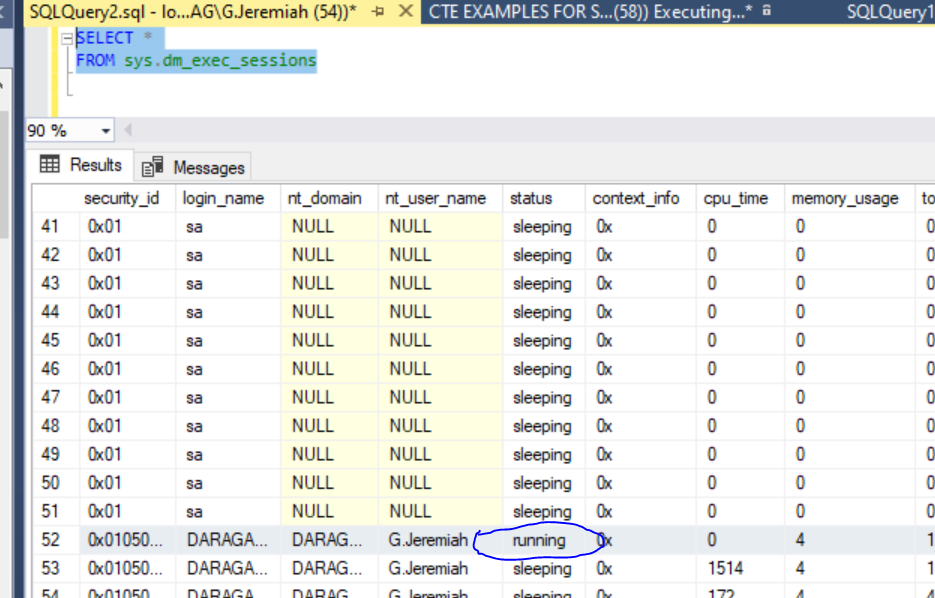
Identify the session id of the session you want to kill.
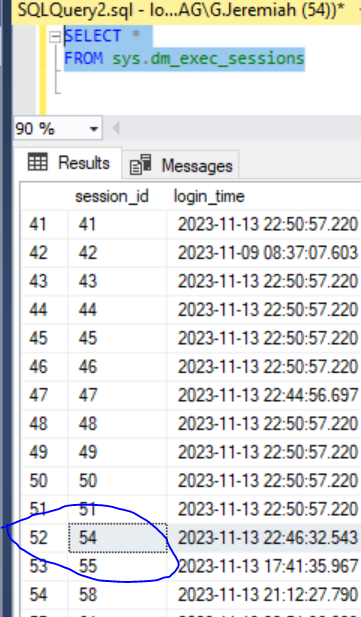
Step 2: KILL Statement:
Once you have identified the session, use the KILL statement followed by the session_id to terminate the session.
KILL session_id;Note!
It’s important to note that forcefully terminating a session can lead to potential data integrity issues, and it should be used with caution. Users might lose unsaved work, and transactions might be rolled back. Additionally, any open transactions by the terminated session will be rolled back.
Ensure that terminating a session is necessary and won’t cause adverse effects on your application or database. Also, make sure you have the necessary permissions to execute the KILL statement (typically requires ALTER ANY CONNECTION or ALTER ANY LOGIN permission).
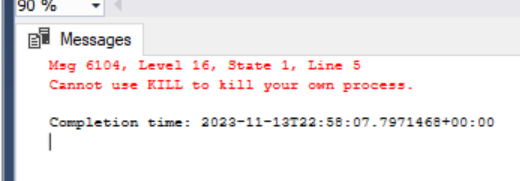
In Microsoft SQL Server, you cannot use the KILL statement to terminate your own session or process. This is a safety measure to prevent accidental termination of the current session, which could lead to unexpected behavior and potential data corruption.
You will get the error if you try to kill your own session.
If you need to disconnect your own session, you typically have a few options:
- Disconnect from SQL Server Management Studio (SSMS):
- If you’re using SQL Server Management Studio, you can simply disconnect by closing the query window or using the “Disconnect” option in the toolbar.
- Use a Different Connection:
- If you’re connected from an application or another tool, you can use a different connection or restart the application.
- Change the Application Code:
- In your application code, you can implement logic to gracefully disconnect from the database when needed.
Always be careful when terminating sessions, especially in a production environment, as it can have consequences on ongoing transactions and data consistency. If you’re trying to troubleshoot or manage sessions, it’s often better to identify and handle these situations through proper monitoring and administrative tools rather than forcefully terminating sessions.
